
SPRAYE's Monthly Installments feature gives you another way to bill customers for their lawn care programs. Instead of charging the customer each time an individual service is completed, the cost of the services enrolled in Monthly Installments is divided into recurring monthly payments through the end of the calendar year.
Monthly Installments is currently available through Early Access, so we recommend reviewing this guide before enrolling your first customers.
What are Monthly Installments?
Monthly Installments allow a customer to pay for an eligible Pay As You Go program or service in scheduled monthly payments.
For example, if a customer enrolls in a $1,200 program beginning October 1:
$1,200 ÷ 3 remaining months = $400 per month
The customer would make payments for October, November and December.
Monthly Installments are calendar-year based and require an eligible payment method on file for automatic payments.
Monthly Installments are not a subscription. The customer's services still have their own individual prices, completion dates and invoices. The monthly payments simply provide another way for the customer to pay for those services over the course of the year.
Important Early Access Limitation
During Early Access, Monthly Installments should be used for new Monthly Installment enrollments.
Do not use Early Access to convert existing mid-season monthly billing customers
If you currently have customers who:
- are already being billed monthly through another system,
- are being charged manually outside of SPRAYE,
- are using a previous monthly billing workaround in SPRAYE, or
- need previous payments or completed services brought into a new Monthly Installment plan,
we recommend keeping those customers on their current billing process for the remainder of this season and moving them to SPRAYE Monthly Installments at renewal.
Additional migration tools are being developed for these situations and are not part of the initial Early Access release.
Existing Pay As You Go programs
You also cannot change an existing Pay As You Go program to Monthly Installments after a service on that same program has already been completed.
If services have already been completed on that program, continue using the customer's current billing method for that program.
Before You Begin
There are three steps that must happen before a customer can use Monthly Installments:
- Your company's Monthly Installment settings must be configured.
- The program must be a Pay As You Go program.
- Offer Monthly Installment Billing must be enabled on that program.
Enabling Monthly Installments in your company settings alone does not automatically make every program available for Monthly Installments.
Step 1. Configure Your Monthly Installment Settings
Before enrolling customers, review your company's Monthly Installment settings.
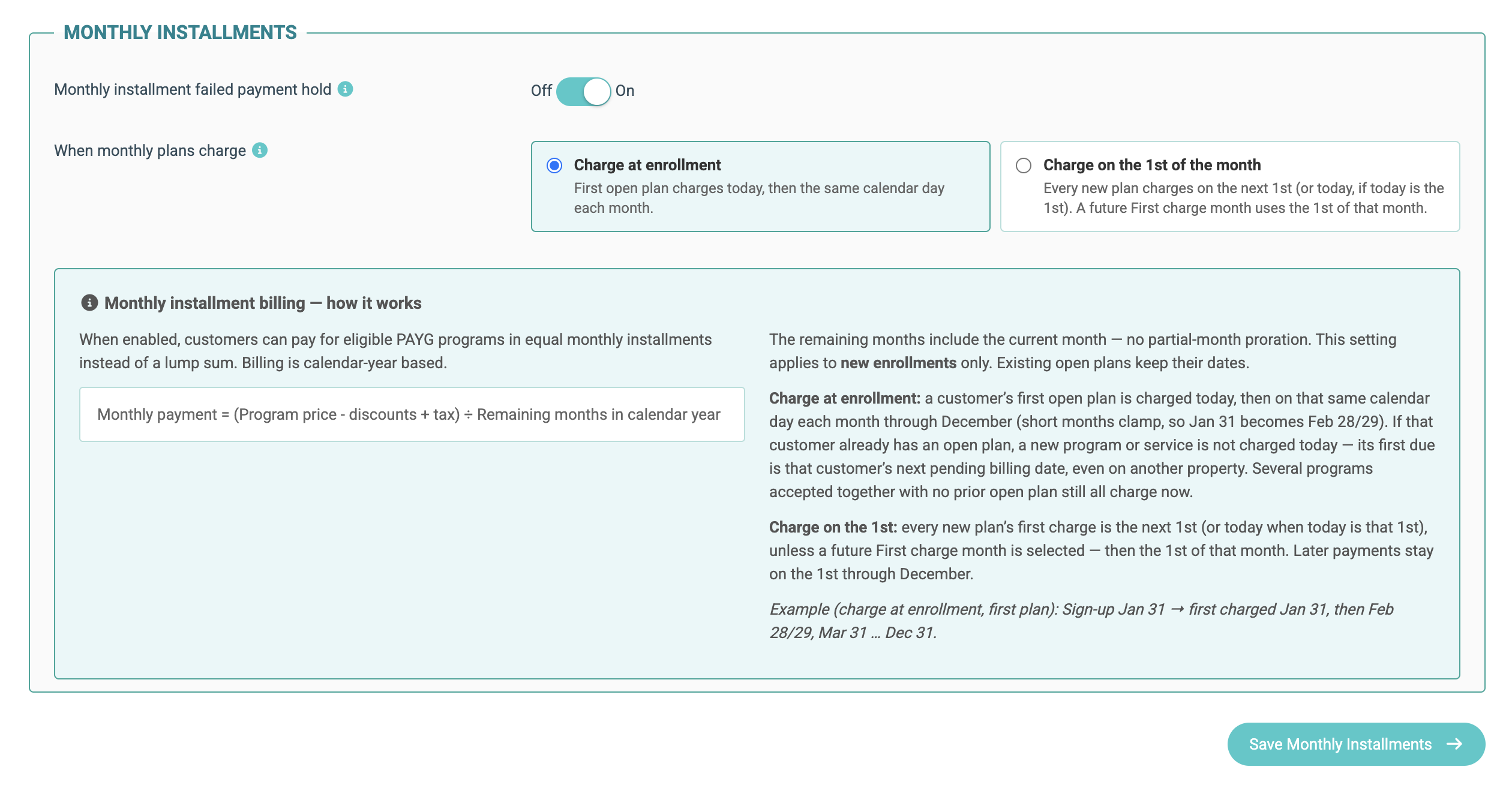
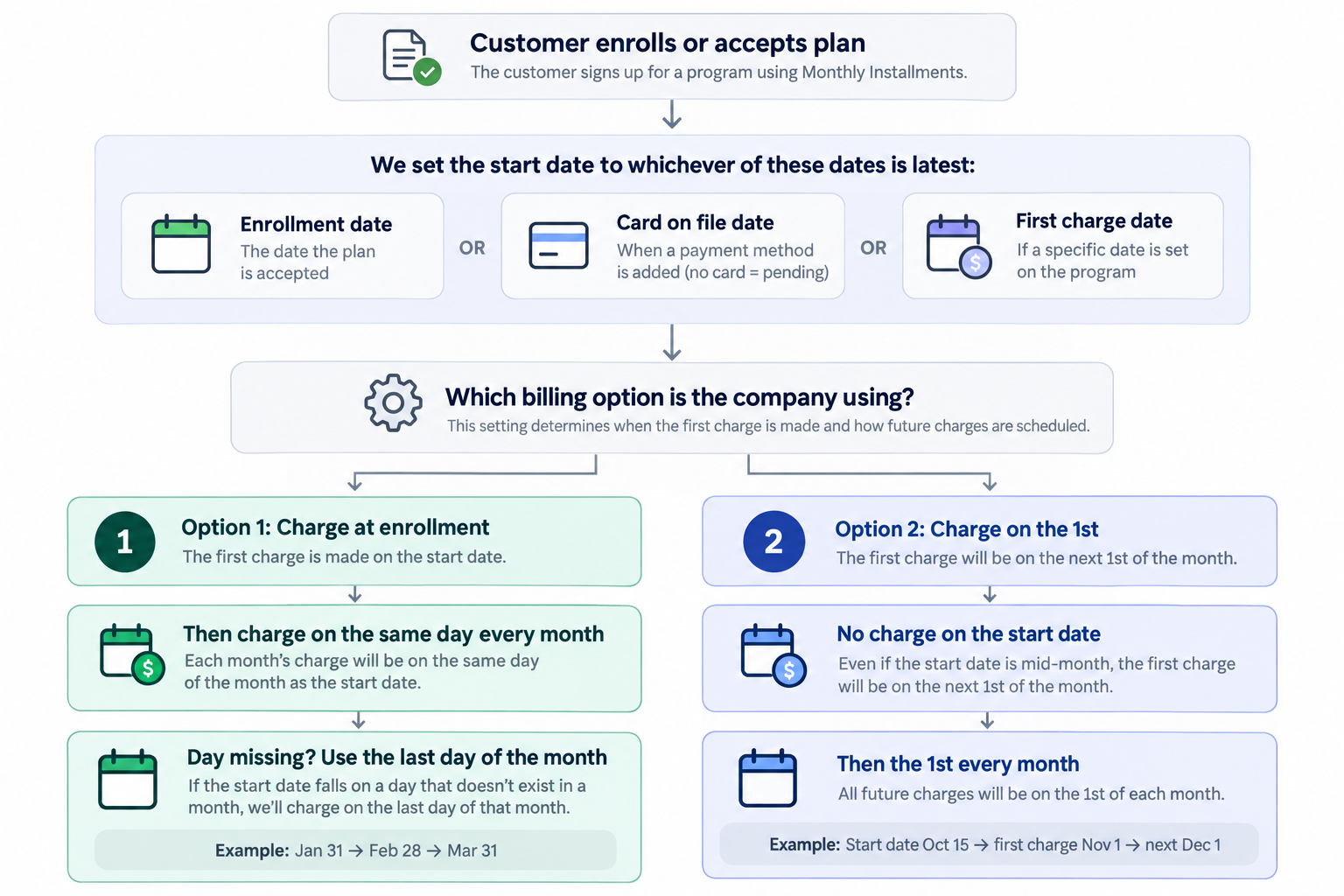
SPRAYE gives you two options for determining when Monthly Installment payments are charged.
Option 1: Charge at enrollment
With Charge at enrollment:
- The customer's first payment is charged when the Monthly Installment plan begins.
- Future payments are charged on the same calendar day each month through December.
For example, if a customer's first payment is charged on October 15, their remaining payments would normally occur on November 15 and December 15.
If that calendar date does not exist in a shorter month, SPRAYE uses the last available day of that month.
If the customer already has a Monthly Installment plan
If a customer already has an active Monthly Installment plan and another program or service is added to Monthly Installments, SPRAYE does not immediately run another separate payment. Instead, the new plan joins the customer's existing billing schedule beginning with the next scheduled payment.
Option 2: Charge on the 1st of the month
With Charge on the 1st of the month:
- New plans are scheduled to charge on the next 1st of the month.
- If enrollment occurs on the 1st, the first payment can be charged that day.
- If a future First Charge Date is selected, the first payment will occur on the 1st of that month after that date.
- Future payments continue on the 1st through December.
Changing this company setting applies to new Monthly Installment plans. Existing plans keep their existing payment dates.
Monthly installments flow chart:
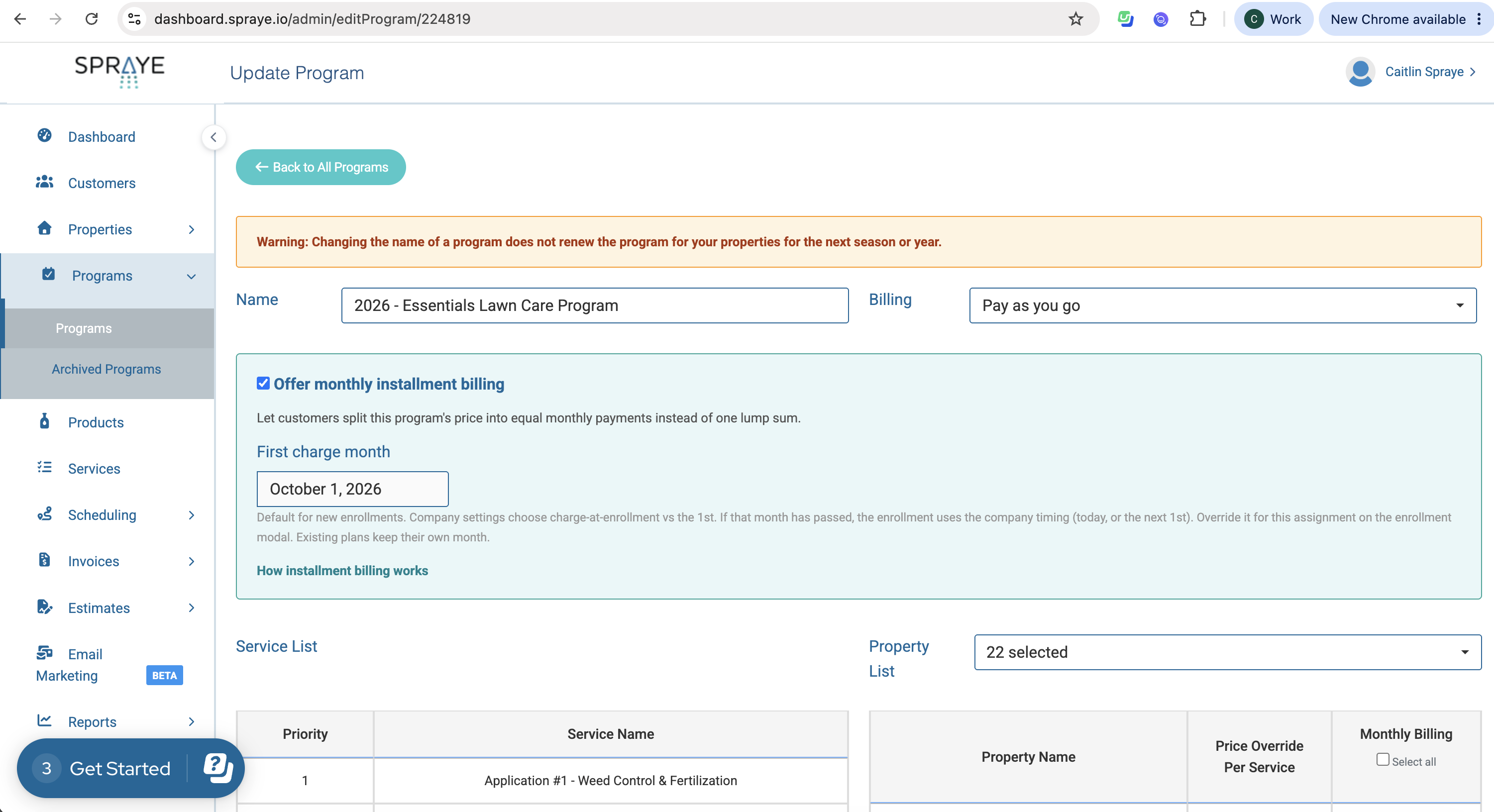
Step 2: Make a Program Eligible for Monthly Installments
Monthly Installments are available for eligible Pay As You Go programs.
Go to:
Programs → Programs
Then create a new program or edit an existing Pay As You Go program.
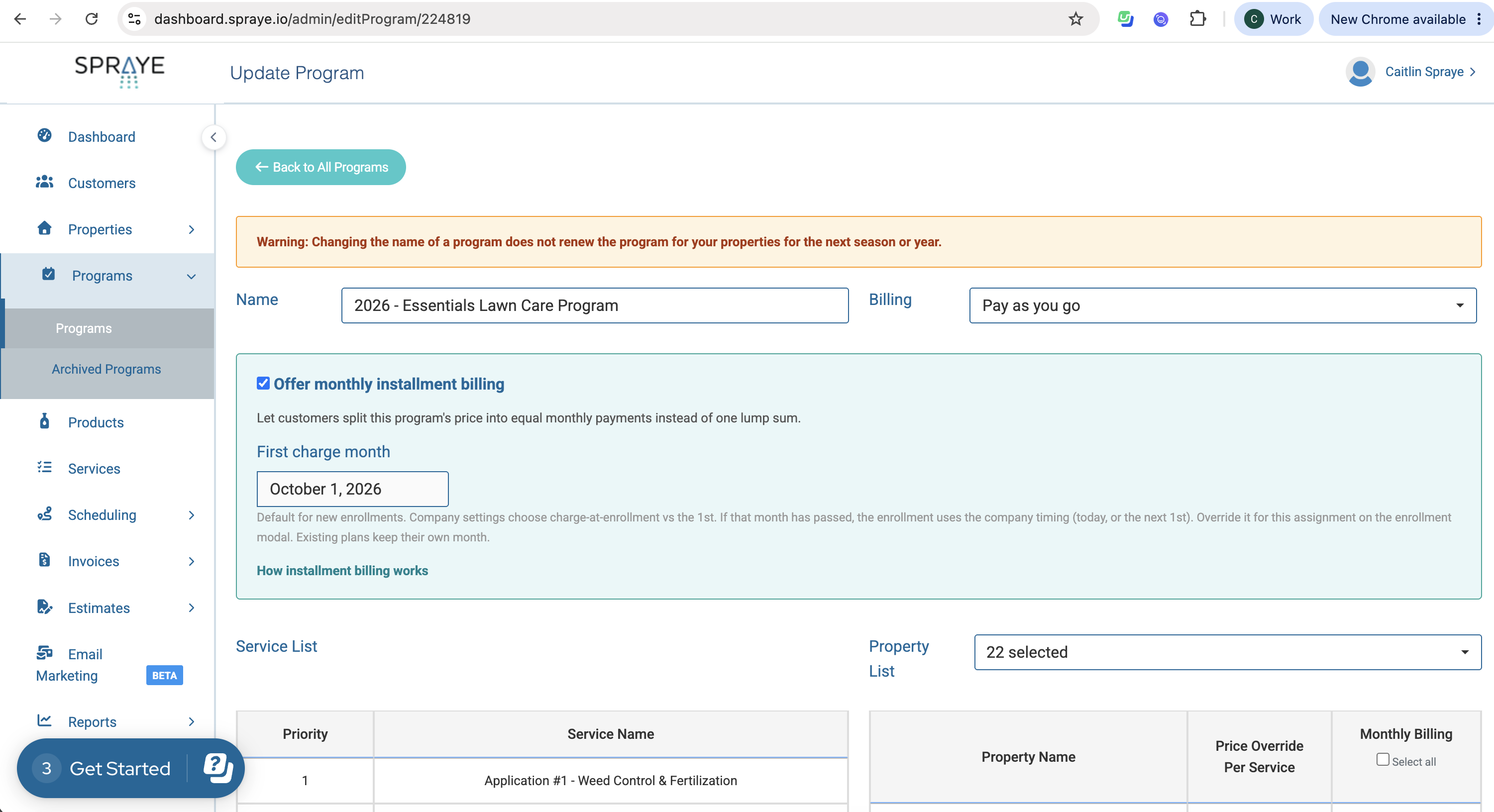
1. Select Pay As You Go as the Billing method
Monthly Installments work as an additional payment option for a Pay As You Go program. They are not a separate program type.
2. Check "Offer Monthly Installment Billing"
Check:
☑ Offer Monthly Installment Billing
This is what makes the program eligible to be enrolled in Monthly Installments.
Important: If this box is not checked, the program will not be available as a Monthly Installment option when creating an estimate or enrolling a property.
3. Select the First Charge Date
The First Charge Date determines the default date on which new Monthly Installment enrollments for this program should begin.
Your company's Monthly Installment settings determine whether the actual charge occurs at enrollment or on the 1st.
The First Charge Date can also be overridden for an individual enrollment when needed.
Save the program when you're finished.
Step 3: Enroll a Customer in Monthly Installments
Once your company settings and program are configured, there are two primary ways to enroll a customer:
Option 1: Let the customer choose Monthly Installments on an Interactive Estimate
Option 2: Manually enroll the customer's property in Monthly Installments
Option 1: Enroll Through an Interactive Estimate
This is a good option when you're selling a new program and want the customer to choose Monthly Installments themselves.
Go to:
Estimates → Interactive Estimates → Create New Estimate
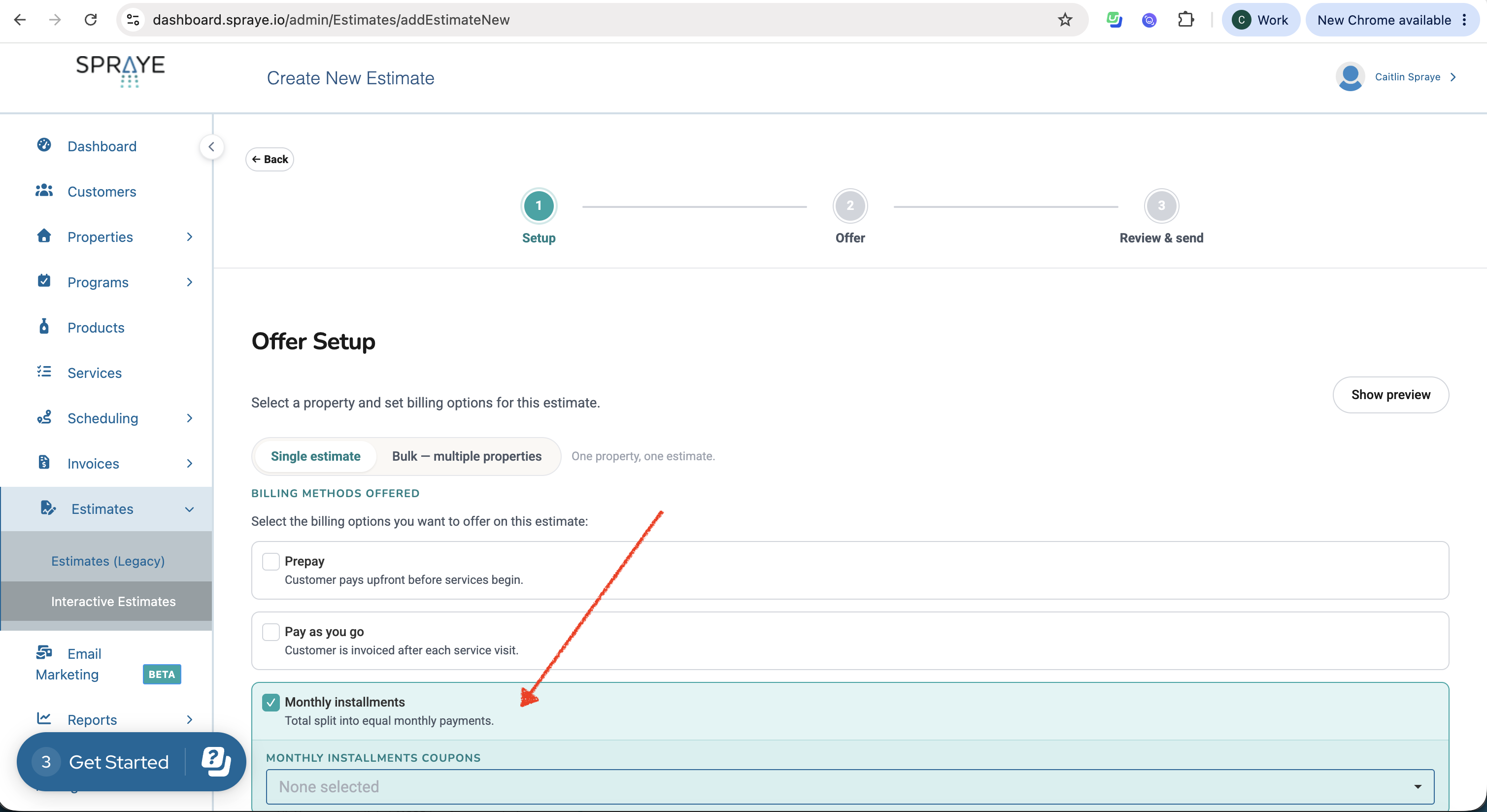
1. Select Monthly Installments as a billing method
In the Billing Methods Offered section, select:
☑ Monthly Installments
You can choose to offer Monthly Installments by itself or alongside other eligible payment choices such as Prepay or Pay As You Go.
2. Build the estimate
Continue building the estimate and add the programs you want to offer.
Only programs that have Offer Monthly Installment Billing enabled are eligible to be offered through the Monthly Installment option.
3. Send the estimate
Send the Interactive Estimate to the customer as usual.
When the customer accepts the offer using Monthly Installments, SPRAYE calculates their monthly payment based on the eligible program total and the remaining monthly payments in the calendar year.
4. SPRAYE collects the customer's payment method
Monthly Installments require automatic payments.
If the customer does not already have the required payment method available, they will be prompted to provide one as part of the enrollment process.
Once the payment method and enrollment are complete, SPRAYE creates the customer's Installment Plan and schedules the payments.
Option 2: Manually Enroll a Customer
You can also place a customer into Monthly Installments yourself instead of having them select it through an estimate.
This is useful when:
- You sold the program outside of an Interactive Estimate
- You're adding a new program directly to an existing customer's property
- The customer has already told you they want to use Monthly Installments
There are two places you may do this.
From the Property Profile
Go to the customer's property and use the same process you normally use to add the property to a program.
Select an eligible Pay As You Go program that has Offer Monthly Installment Billing enabled and choose Monthly Installments for that enrollment.
Review the first charge information and complete the enrollment.
From the Program
You can also enroll properties while working directly from the Program screen.
The Property List displays a Monthly Billing option next to the properties assigned to the program.
Select Monthly Billing for the property or properties you want to enroll.
Because this can affect customer billing automatically, we recommend starting with a small number of enrollments while you become familiar with the feature during Early Access.
What If the Customer Doesn't Have a Card on File?
Monthly Installments require an eligible payment method for automatic payments.
If you manually enroll a customer who does not have the required payment method on file, SPRAYE can send the customer a payment-method collection email or they can login to their customer portal to add a card on file there. Alternatively, you can manually enter their card information on their customer profile from the admin side of SPRAYE (click "Update payment method").
The customer can use the secure link in the email to enter their payment information.
The Monthly Installment plan cannot begin charging successfully until the required payment method is available.
Step 4: Confirm the Customer Was Enrolled
After enrollment, there are two easy places to verify the customer's Monthly Installment information.
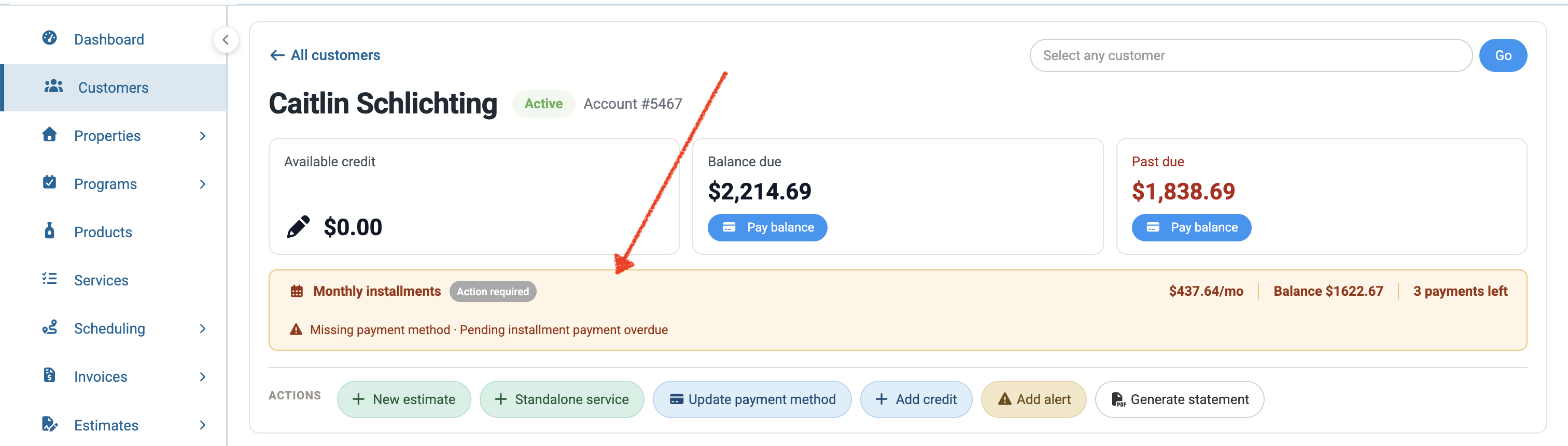
Customer Profile
Customers with an active Monthly Installment plan display a Monthly Installments section near the top of the Customer Profile.
This provides quick visibility into information such as:
- Monthly payment
- Remaining balance
- Number of payments remaining
Monthly Installments Page
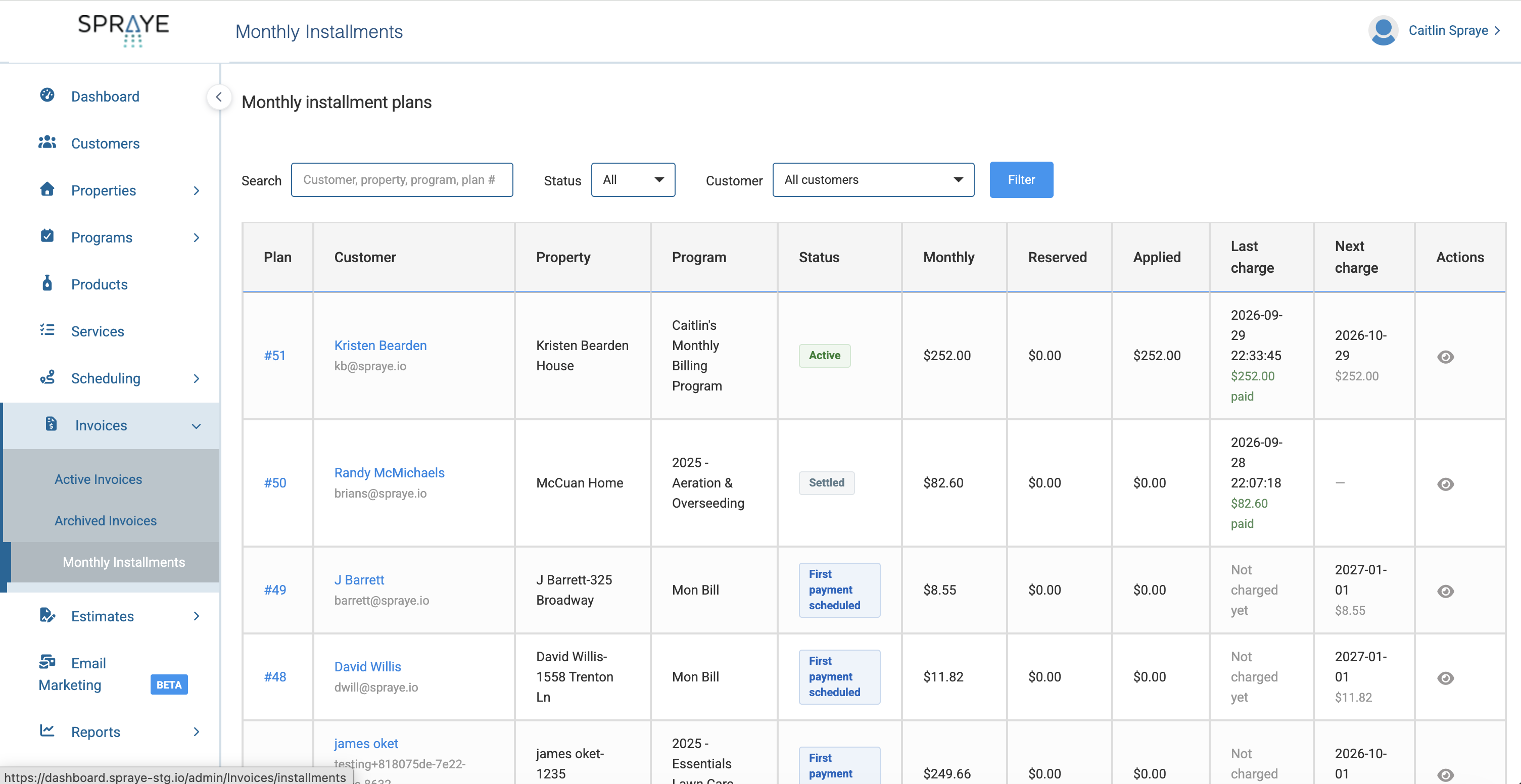
Go to:
Invoices → Monthly Installments
This page shows your Monthly Installment plans and information such as:
- Customer
- Property
- Program
- Status
- Monthly payment
- Reserved amount
- Applied amount
- Last charge
- Next charge
Select the plan number to see its details.
Step 5: Review an Individual Installment Plan
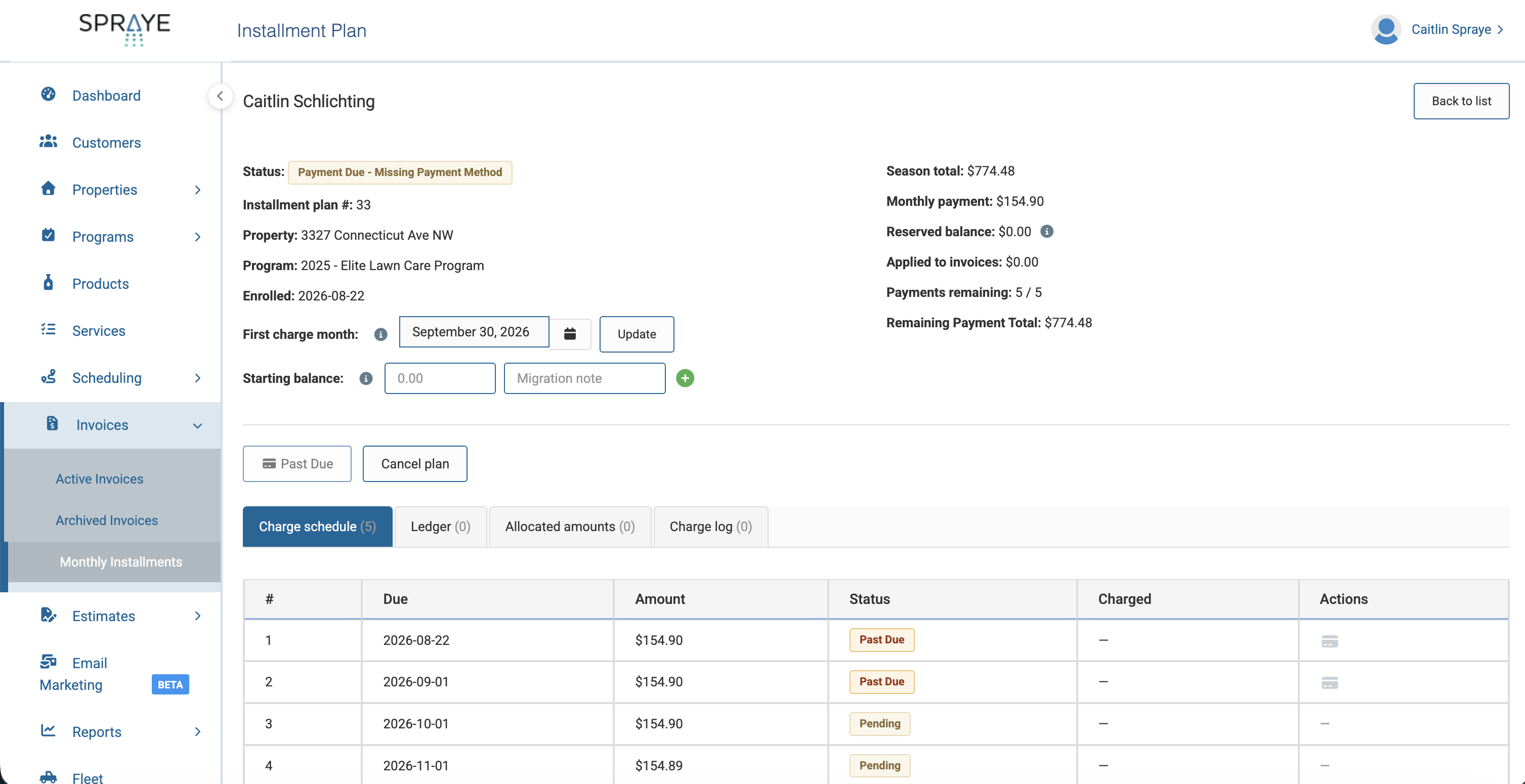
Open an Installment Plan to see its complete billing information.
You'll see details including:
Season Total
The total amount associated with that Installment Plan.
Monthly Payment
The monthly amount scheduled for that plan.
Reserved Balance
Money already collected through Monthly Installments that has not yet been applied to eligible completed-service invoices.
Applied to Invoices
The amount already applied to invoices for completed services.
Payments Remaining
The number of scheduled Monthly Installment payments still remaining.
Remaining Payment Total
The amount still scheduled to be collected.
You can also review:
- Charge Schedule
- Ledger
- Allocated Amounts
- Charge Log
The Charge Schedule shows each scheduled payment date, amount and payment status.
How the Monthly Payment Is Calculated
For the current calendar year, SPRAYE divides the applicable amount enrolled in Monthly Installments across the remaining payments through December.
For example:
Program total: $1,200
Enrollment: October
Remaining months: October, November and December
Monthly payment: $1,200 ÷ 3 = $400
There is no partial-month proration.
For a full calendar year, an eligible $1,200 program divided across 12 monthly payments would be $100 per month.
What Happens If a Customer Has Multiple Programs?
A customer can have more than one program or service enrolled in Monthly Installments.
SPRAYE may create a separate Installment Plan for each program or service behind the scenes so each can be tracked correctly.
However, SPRAYE combines eligible Installment Plans for the same customer into one scheduled monthly payment.
For example:
Program A Monthly Installment: $100
Program B Monthly Installment: $40
Customer's scheduled Monthly Installment payment: $140
The plans remain separately tracked inside SPRAYE even though the customer receives one combined charge.
How Monthly Payments and Services Work Together
Monthly Installment payments and service completion do not have to happen at the same time.
A customer could make several payments before a higher-priced application is completed, or the value of completed services could temporarily exceed the amount collected so far.
SPRAYE tracks those differences through the customer's Installment Plan.
As Monthly Installment payments are collected, the funds are tracked with the plan. As eligible services are completed and invoiced, the appropriate amounts are applied toward those invoices.
This is why you may see a Reserved Balance at certain points during the season.
What Happens if Services Change?
Changes made during the season can cause the final value of the services performed to differ from the original Monthly Installment amount.
Examples include:
- Skipping a service
- Deleting a service
- Changing pricing
- Adding another service
- Adding another program
- Canceling before the program is completed
Because of this, a customer may eventually have either:
- A remaining Reserved Balance, or
- An amount still owed
Those amounts can then be reconciled based on the services the customer actually received.
Important Early Access Limitation
During Early Access, we recommend using Monthly Installments for new enrollments.
Please do not use this release to move customers who are already partway through an existing monthly billing arrangement into the new Monthly Installments feature.
This includes customers who are currently:
- Being billed monthly through another CRM
- Being charged manually through a payment processor
- Using a previous Monthly Billing workaround in SPRAYE
For these customers, we currently recommend continuing their existing billing method through the end of the season and moving them to the new Monthly Installments feature at renewal.
Additional tools for migrating existing Monthly Installment balances and previously completed services are still being developed.
FAQs?
View all FAQs and troubleshooting tips here: https://support.spraye.io/support/solutions/articles/47001307664-monthly-installment-billing-faqs-troubleshooting
Need Help?
Monthly Installments is currently in Early Access, and your feedback is important to us.
If you're unsure how to enroll a particular customer, make a change to an existing Installment Plan, or reconcile a balance, please contact SPRAYE Support before making manual billing adjustments.
We'd also love to hear about workflows or situations you encounter that you think we haven't considered yet.